
Southerly
The whole forecast at a glance.
Southerly draws the coming weather as a single radial dial. Temperature, rain, wind, day and night all appear together. Instead of scrolling through lists of numbers, you see the shape of the weather.

Qaqortoq, Greenland, on the 24-hour dial
Temperature, rain, wind and daylight
Each part of the dial carries a different measurement. One look answers questions like “will it warm up this afternoon?” and “when does the rain arrive?”
Temperature ring
The coloured ring shows temperature. Warm hours are amber and cold hours are blue. The day's rise and fall traces a shape around the dial.
Rain & snow
A blue bloom swells from the centre at the hours when rain or snow is due. Even light drizzle lifts clearly off the dry baseline.
Wind & gusts
Fine spokes grow longer as the wind strengthens. A dot above each spoke marks the gust. The gap between spoke and dot shows how gusty it is.
Day & night
The rim fades from light to dark at the real sunrise and sunset. Very high UV is flagged on the temperature ring.
Weather, Radially
Sweep the hand to any moment and the readings above the dial change to that hour's temperature, wind, rain and conditions. The centre shows the day and time you've chosen. The dial is laid out like a clock face. Each hour keeps its place while the data moves under your finger.
-
12 hours, 24 hours or 7 days
Switch scales with one tap. The same layout covers the next few hours or the whole week ahead.
-
Feel the weather
As you scrub, haptics follow the measurement you choose: wind, tide, temperature or rain. A firm tick marks each midnight.
-
One tap back to now
The rewind button below the dial returns the hand to the present.

A dial shows how the day changes
A list of hourly figures gives you eight separate readings. The dial shows the trend they make. The day warms through the afternoon, the wind builds toward evening and rain arrives after six.
-
Everything at once
Temperature, rain and wind share one frame. You can compare them at a glance.
-
Time you can feel
Because time wraps around the dial, “this afternoon” and “after midnight” are places on the face that you can point to.
-
The same scale every day
Rain and wind are drawn on a fixed scale that doesn't change from day to day. Heavy rain always looks heavy, and a light breeze always looks light.
Pressure charts and rain radar
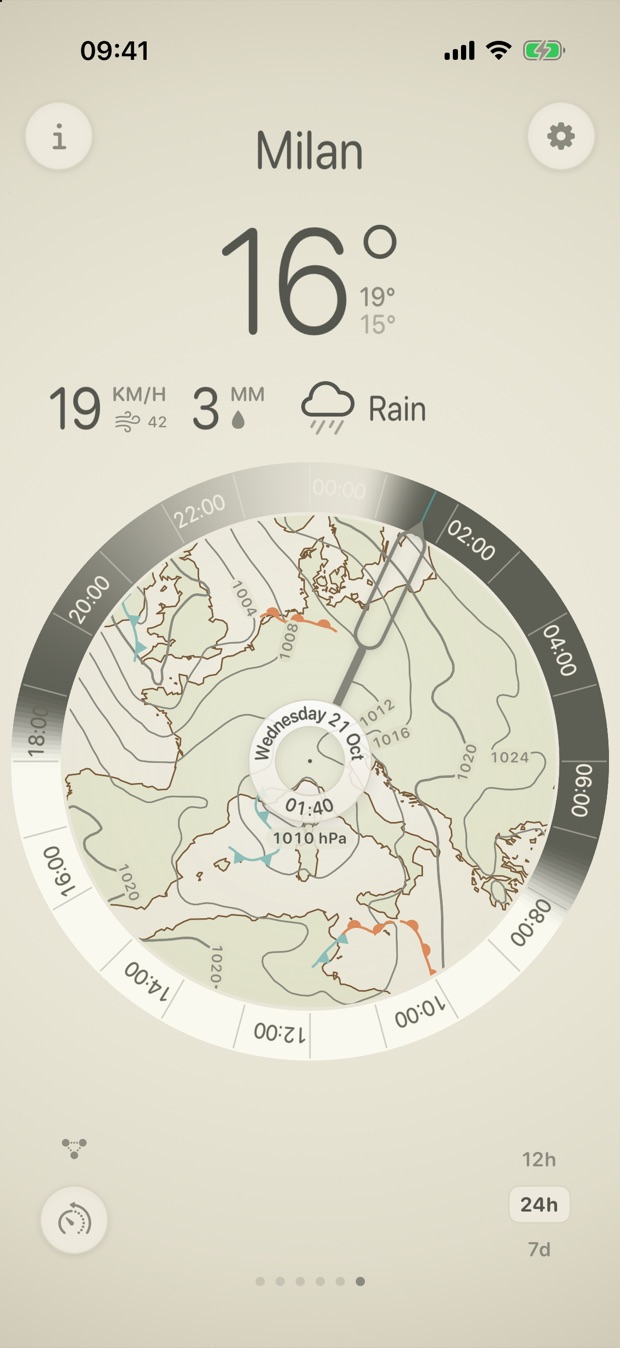
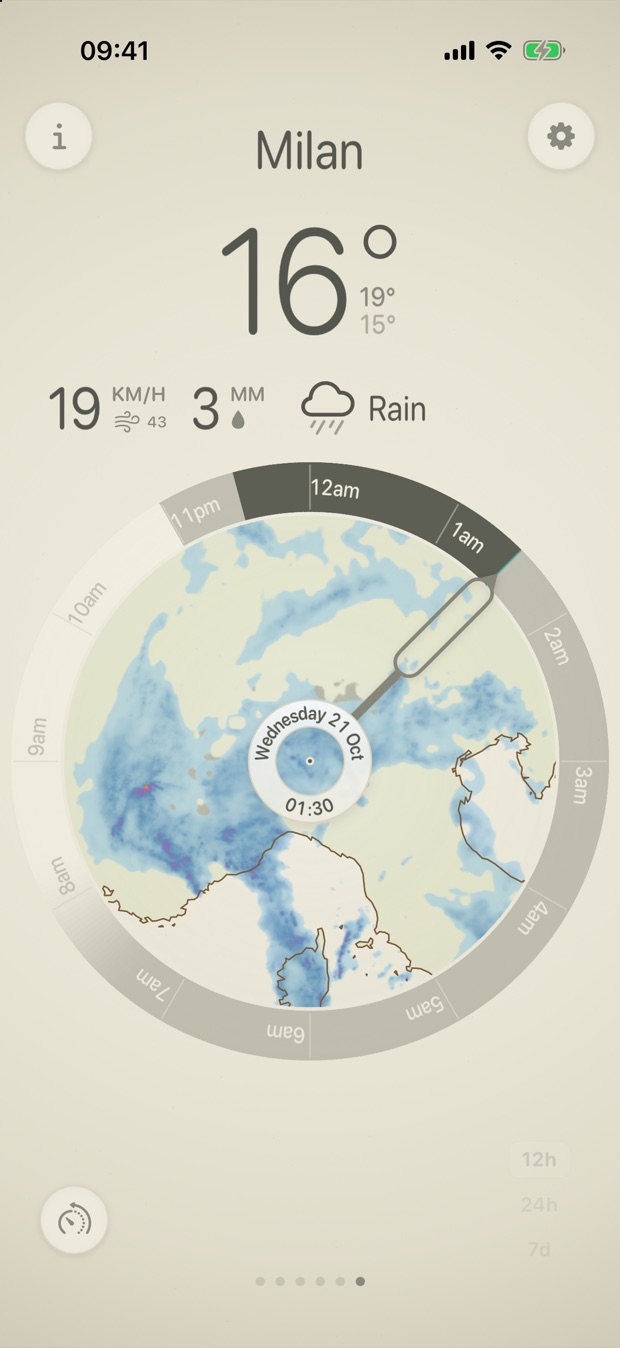
Double-tap the centre of the dial and its face turns into a weather map of the region around you. Double-tap again for the rain radar. The hand still sets the time, and the readings above the dial follow it.
-
Isobars and fronts
The pressure chart draws isobars 4 hPa apart. H and L mark the highs and lows, and blue and red symbols mark the cold and warm fronts. Rotate the dial to look up to five days ahead.
-
The last two hours of rain
The radar shows rain that has actually fallen, as national radar networks measured it. Turn the hand back through the last two hours to see which way the showers are moving.
-
Read it at a glance
Pale blue is light rain and deep blue is heavy. Purple is very heavy, orange is hail and grey is snow. The radar appears wherever a national network covers the location.
Southerly on Apple Watch
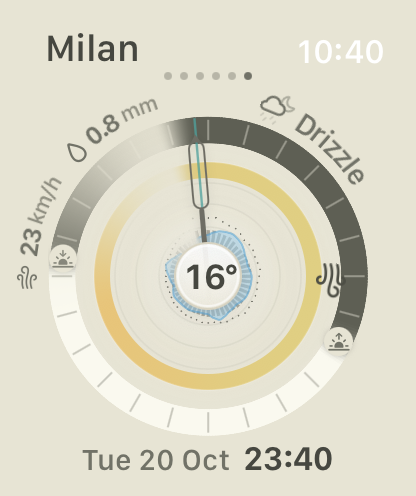
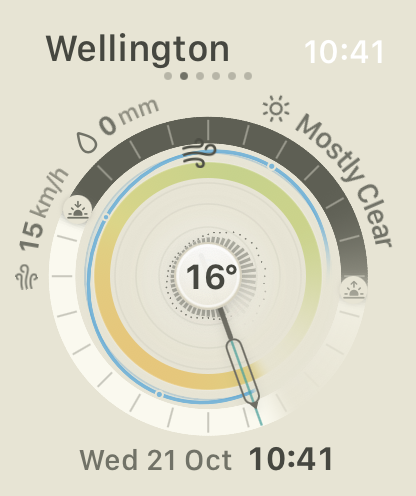
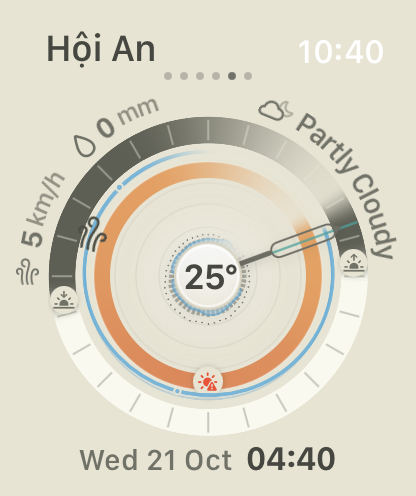
The watch app carries the 24-hour dial for every place saved on your iPhone. Swipe between them, and turn the Digital Crown to move the hand through the day.
-
Turn the crown
Each click of the Digital Crown moves the hand half an hour. The NOW button brings it back to the present.
-
Readings around the dial
Wind, rain and the conditions curve around the top of the dial. The temperature sits in the centre, and the day and time run along the bottom. Coastal places keep the tide line.
-
Kept in step with your iPhone
The watch uses the forecasts your iPhone has downloaded, with the same places, units and te reo setting. There is nothing to set up on the watch.
Tides, warnings and more
Southerly is made on the southern edge of the world. It includes a few things most weather apps leave out.
Tides, built in
Southerly predicts tides offline from more than 5,000 harmonic tide stations worldwide. Where there's no gauge nearby, the FES2022 global tide model fills the gap. Everything is computed on your phone and works without a connection. Coastal locations get a tide line drawn around the dial.
For information only. Never use it for navigation.
Weather warnings
When an official weather warning covers a location, a warning mark appears under the dial. Tap it to read the warning, the area it covers and who issued it. In the United States, warnings come from Apple Weather. Elsewhere they come from national weather services through the IFRC Alert Hub, where available.
Always follow advice from local authorities.
Rising and falling pressure
Turn on Air Pressure to draw a thin crimson line around the dial. It swings outward while pressure rises and inward while it falls. A line lying flat on its ring means steady pressure. A sharp fall often comes ahead of wind and rain.
Earthquakes nearby
A seismograph mark appears under the dial after an earthquake of magnitude 4 or more within 100 km. It stays for three hours, and its colour deepens with the magnitude. Tap it for the time, distance, depth and a link to the full report. Reports come from GeoNet in Aotearoa and the EMSC everywhere else.
High, low and feels like
The day's forecast high and low sit under the big temperature. Turn on Feels Like to show the apparent temperature there instead. It takes wind and humidity into account.
On your Home Screen
The medium widget shows the 24-hour dial with the temperature, conditions, wind and rain beside it. The small widget shows the current reading over a slice of the dial. Both use the forecast the app last downloaded and keep moving with the clock.
Te ao Māori
Turn on te reo Māori to see place names, days and conditions in te reo across Aotearoa. The maramataka, the Māori lunar calendar, shows tonight's named pō, its moon phase and the Tangaroa nights for trapping.
Reo Māori · Maramataka
Lunar noon
A small moon on the dial marks the moment the moon stands highest in the sky. It is drawn in its current phase. Hunters and fishers plan around this time as a major solunar period. It appears on the 12- and 24-hour dials.
The next 24 hours in words
On devices with Apple Intelligence, Southerly writes a short, plain-language summary of the next 24 hours. It runs on the device and works offline. The summary can mention details the dial doesn't show, such as humidity or tide times.
Glows in the dark
Dark Mode puts the dial on a charcoal background. The temperature ring glows in its own colours, and the rain and tide line brighten against the dark. The first time you open Southerly, it matches your device's appearance.
For the navigators
Turn on Navigation to see live heading, altitude and speed at your current position. The dial gains a north marker, set to true or magnetic north. Speed shows in your chosen unit, including knots.
Your units, your way
Choose metric (°C and millimetres) or imperial (°F and inches). Wind can read in Beaufort, m/s, km/h, mph or knots. Save the places you care about and swipe between them. Each one shows its own local time.
Light mode, dark mode and te reo Māori


The whole forecast on one dial
Forecasts come from Apple Weather. Tides and weather summaries are computed on your phone. The dial comes with you on Apple Watch. There's no account and no tracking.